
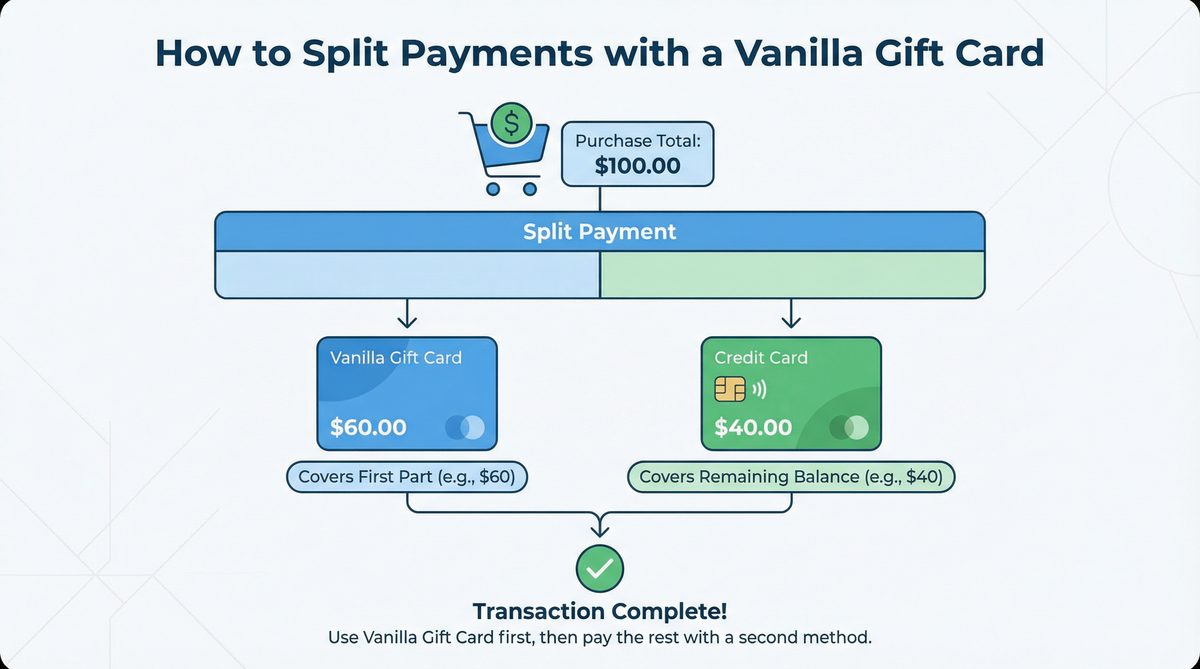
Vanilla Gift Cards are a popular option for gifts and prepaid payments, offering great flexibility in shopping. However, users sometimes encounter situations that require splitting a single payment across multiple payment methods, especially when the available balance on the card is insufficient to cover the full purchase amount. This article aims to clarify how to split payments using a Vanilla gift card, with a focus on practical guidance for shoppers in the United States and Canada, and providing solutions to common challenges.
Split tender transactions refer to using two or more payment methods to complete a single purchase transaction. For example, a customer might use a gift card to cover part of the amount, then pay the remaining balance using a credit card or cash. The ability to split payments varies significantly between physical stores and online retailers, often due to technical systems and payment policies in place.
In physical stores, splitting payments is a common and accepted practice in most cases. A cashier can process a partial payment using a Vanilla gift card, then request another payment method for the remaining amount. This is due to the flexibility of point-of-sale (POS) systems and the ability of staff to intervene manually. In contrast, online retailers face greater challenges in supporting split payments. Many electronic payment gateways are designed to process a single transaction with one payment method. However, some major platforms have begun offering split payment options, especially when using store-specific gift cards or combining a general gift card with a credit/debit card.
Some stores may be reluctant to accept split payments for several reasons, including the complexity of the transaction, which can slow down checkout lines and increase the likelihood of errors. There may also be technical limitations in point-of-sale systems or electronic payment gateways that are not equipped to handle multiple payment methods for a single transaction. Additionally, some stores may enforce internal policies that restrict split payments to simplify operations or for security reasons.
Splitting payments in physical stores using a Vanilla gift card is a relatively straightforward process in most cases. Here are the steps and tips to ensure a smooth experience:
To ensure a smooth payment experience, be clear and direct with the cashier about your intention to split the payment, as this helps avoid confusion and errors. Also make sure you know the exact balance on your card to avoid any surprises at checkout. Finally, be patient, as split payment processing may take slightly longer than a regular payment.
Most major retailers, grocery stores, and restaurants in the United States and Canada allow split payments. These include chains such as Walmart, Target, Kroger, Loblaws, and Sobeys, as well as many local stores. However, policies may vary from store to store, so it's always recommended to ask in advance if you're unsure.
Splitting payments online is more complex than in physical stores due to technical limitations of payment gateways. However, there are some strategies you can try:
The main challenges are that many e-commerce websites do not explicitly support using two different payment methods for a single transaction. Additionally, a Vanilla gift card may encounter authorization issues if the purchase amount exceeds the available balance, resulting in the entire transaction being rejected.
To overcome the challenges of splitting payments online, you can try several strategies:
| Method | Physical Stores | Online Stores | Effectiveness | Notes |
|---|---|---|---|---|
| Direct Payment with Cashier | High | Not Available | High | Requires clear communication with the cashier. |
| Use Vanilla Card as Primary Payment Method (Online) | Not Available | Medium | Medium | Depends on site support for multiple payment gateways. |
| Purchase Store Gift Cards | Not Available | High | High | Excellent solution for using remaining balance. |
| Split Order into Smaller Transactions | High | High | High | Requires flexibility in the purchase process. |
| Link Card to Digital Wallet | Medium | Medium | Medium | Depends on digital wallet support for gift cards. |
To ensure a smooth experience when using a Vanilla gift card, especially when considering split payments, follow these tips:
Q: Can I use a Vanilla gift card with another credit card?
A: Yes, in most physical stores, you can split the payment between a Vanilla gift card and another credit or debit card. Online, it depends on the store's policies and payment gateway.
Q: What should I do if the split payment is declined?
A: First, check the available balance on your Vanilla card. If the balance is sufficient, the problem may be with the store's system or payment gateway. Try using a different payment method or splitting your order differently. In physical stores, ask the cashier for assistance.
Q: Can I split payments online?
A: Yes, but it's more complicated. Some websites allow it directly, while others require using alternative strategies such as purchasing store gift cards using your Vanilla card.
Q: Are there additional fees for split payments?
A: There are usually no additional fees for split payments themselves. However, there may be maintenance or activation fees for the Vanilla gift card itself, which you should verify when purchasing the card.
Q: Can I use a Vanilla gift card in Canada/United States?
A: Vanilla gift cards are country-specific. US cards work only in the United States, and Canadian cards work only in Canada. Make sure to use your card in the country where it was issued.
Splitting payments using a Vanilla gift card is possible, but it requires some planning and knowledge, especially when shopping online. In physical stores, the process is usually smooth once you communicate clearly with the cashier. Online, you may need to use alternative strategies such as purchasing store gift cards or splitting your orders. By understanding how this process works and following the tips provided, you can maximize the use of your Vanilla gift card and use every cent of its balance.
Buy a Vanilla Gift Card Now![1] Quora - Can you use a Vanilla Visa gift card to make partial payments: https://www.quora.com/Can-you-use-a-Vanilla-Visa-gift-card-to-make-partial-payments
[2] Giftcards.com - How to Use Visa Gift Cards Online for Partial Payment: https://www.giftcards.com/us/en/blog/visa-egiftcard-payment
[3] VanillaGift.com - Frequently Asked Questions: Vanilla Gift Card Q&A: https://www.vanillagift.com/help
[4] Reddit - Embarrassing question..... but can you use a Visa gift card ...: https://www.reddit.com/r/NoStupidQuestions/comments/9c1coh/embarrassing_question_but_can-you-use-a-visa-gift/
[5] WikiHow - How to Use a Visa Gift Card Online for Partial Payment: https://www.wikihow.com/Use-Visa-Gift-Card-Online-for-Partial-Payment
[6] JustGoodShit.com - Here's my little hack for using every last cent on a Visa ...: https://www.justgoodshit.com/blog/visa-american-express-amex-mastercard-prepaid-gift-cards-balance-amazon-hack
[7] Visa.ca - Visa Gift Cards: https://www.visa.ca/en_CA/pay-with-visa/cards/gift-cards.html
[8] eBay Community - Split payment with Vanilla gift card and debit card: https://community.ebay.com/t5/Payments/Split-payment-with-Vanilla-gift-card-and-debit-card/td-p/33031715
[9] VanillaGift.com - How to Use a Vanilla Gift Card Online: https://www.vanillagift.com/blog/how-to-use-vanilla-visa-online
[10] Visa.ca - Visa Gift Cards: https://www.visa.ca/en_CA/pay-with-visa/cards/gift-cards.html