
How to Use Vanilla Gift Card on Amazon - Complete Guide
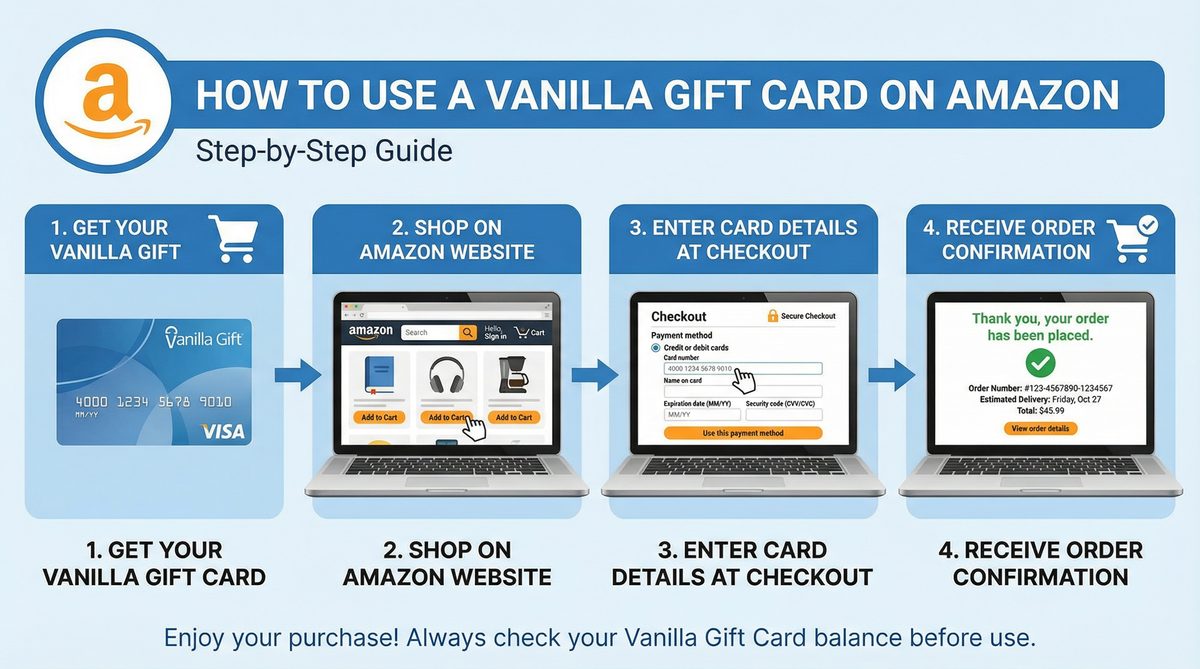
Vanilla Gift Cards are a popular gift option due to their flexibility and wide acceptance. If you own a Vanilla gift card and are wondering how to use it for your favorite purchases on Amazon, you've come to the right place. This comprehensive guide is designed to provide you with detailed steps and practical instructions to ensure a smooth shopping experience on Amazon, whether you're in the United States or Canada. We'll cover everything you need to know, from activating the card to troubleshooting common issues.
Understanding Vanilla Gift Cards
Vanilla gift cards are prepaid cards issued by companies such as Visa or Mastercard. These cards work like regular debit cards, meaning they can be used anywhere that accepts Visa or Mastercard. However, when using them online, especially on platforms like Amazon, you may need to take some additional steps to ensure the transaction is processed successfully.
Types of Vanilla Gift Cards
Vanilla gift cards are typically available in two main types:
- Vanilla Visa Gift Card: Accepted anywhere that accepts Visa cards.
- Vanilla Mastercard Gift Card: Accepted anywhere that accepts Mastercard.
Both types work similarly when shopping online, but it's important to check the logo on your card to determine which type you have.
Essential Steps Before Using Your Card on Amazon
Before attempting to use a Vanilla gift card on Amazon, there are two critical steps you must take to ensure the transaction succeeds:
1. Activate Your Vanilla Gift Card
Most Vanilla gift cards require activation before use. Usually, the card is activated automatically at purchase, but in some cases, you may need to activate it yourself online or by phone. Look for a sticker or instructions on the back of the card or on the packaging for activation instructions. This may involve visiting a specific website or calling a customer service number.
2. Register Your Card and Set a Billing Address
This is the most important step and one that users often overlook, leading to failed online transactions. Amazon, like many online retailers, requires a billing address linked to the card for security verification purposes. Since gift cards don't have a default billing address, you must register your card online and assign a billing address to it. This address should be the same one you'll use in your Amazon account.
How to Register Your Vanilla Gift Card:
- Find the Website: Look for the Vanilla card website (usually printed on the back of the card or on the packaging). It may be something like vanillavisa.com or vanillamastercard.com.
- Enter Card Information: Enter your card number, expiration date, and CVV code (the 3 or 4-digit security code).
- Set Billing Address: Follow the instructions to set a billing address (usually your home address). Make sure this address matches exactly with the address you'll use on Amazon.
Methods for Using Vanilla Gift Card on Amazon
There are two main ways to use a Vanilla gift card on Amazon, each with its own advantages:
Method One: Add the Card as a Direct Payment Method
This is the most straightforward method, where you add your Vanilla gift card to your Amazon account as a regular credit/debit card.
Steps:
- Log in to Amazon: Sign in to your account on Amazon.com (for the United States) or Amazon.ca (for Canada).
- Go to Payment Methods: Go to "Your Account" and then "Your Payments".
- Add a New Payment Method: Click "Add a payment method" and then "Add a credit or debit card".
- Enter Card Details: Enter your Vanilla gift card number, expiration date, and your name as it appears on the card (or simply "Cardholder" if there's no specific name). Make sure the billing address you entered earlier when registering the card matches the address associated with your Amazon account.
- Save the Card: Click "Add your card".
- Make a Purchase: At checkout, select your Vanilla gift card as the payment method. Make sure the purchase amount doesn't exceed the available balance on the card.
Method Two: Transfer Balance to Amazon Gift Card Balance (Recommended)
This method is the most reliable and least prone to issues, especially if you're having trouble using the card directly. This method converts your Vanilla gift card balance to an Amazon gift card balance, which you can use anytime.
Steps:
- Log in to Amazon: Sign in to your account on Amazon.com (for the United States) or Amazon.ca (for Canada).
- Go to "Reload Your Balance": Look for "Gift Cards" in your "Your Account" menu or search directly for "Reload Your Balance" in the search bar.
- Enter the Amount: Enter the amount you want to transfer. Important Note: The amount must be equal to or less than the available balance on your Vanilla gift card. Don't try to transfer an amount greater than your card's balance, as this may result in transaction failure.
- Choose Payment Method: Select "Add a new credit or debit card" and enter your Vanilla gift card details as shown in Method One.
- Complete the Purchase: Finish the purchase. The amount will be added to your Amazon gift card balance immediately, and you can use it for future purchases without any issues.
Comparison of Usage Methods
| Feature / Method | Add as Direct Payment Method | Transfer to Amazon Gift Card Balance (Recommended) |
|---|---|---|
| Ease of Use | Medium, may encounter some issues | Very high, once transferred, usage becomes seamless |
| Success Rate | Lower, transactions may fail due to verification issues | Much higher, once balance is added, it becomes part of your Amazon account |
| Flexibility | Can be used once or until balance is depleted | Balance can be used in multiple transactions without restrictions |
| Troubleshooting Common Issues | Requires additional steps such as card registration and billing address | Avoids most common issues related to card verification |
| Balance Verification | Must check balance before each purchase | No need to check balance after transfer, it shows in your Amazon account |
Troubleshooting: Why Isn't My Vanilla Gift Card Working on Amazon?
You may encounter some issues when trying to use a Vanilla gift card on Amazon. Here are some common reasons and suggested solutions:
1. Card Not Activated
- Problem: The card was not activated properly.
- Solution: Make sure you've activated your card by following the instructions on the card or packaging. Visit the Vanilla card website or call customer service.
2. Billing Address Not Registered
- Problem: You didn't register a billing address for your card, or the registered address doesn't match the address in your Amazon account.
- Solution: Register your card online on the Vanilla website and set a billing address. Make sure this address matches exactly with the address you use on Amazon.
3. Insufficient Balance
- Problem: The purchase amount is greater than the available balance on the card.
- Solution: Check your card balance before making a purchase. You can usually check the balance on the Vanilla card website. If the balance is insufficient, you can use Method Two (transfer balance to Amazon gift card) and purchase an Amazon gift card for an amount equal to or less than your available balance, then pay the remaining amount with another payment method.
4. Attempting to Use Two Cards in One Transaction
- Problem: You're trying to combine a Vanilla gift card with another credit card in the same order.
- Solution: Amazon doesn't allow combining prepaid gift cards with regular credit cards in the same order. Use your Vanilla gift card alone or transfer its balance to an Amazon gift card balance.
5. Technical or Security Issues
- Problem: There may be a temporary technical issue or Amazon suspects fraudulent activity.
- Solution: Try again later or contact Amazon customer service. If Amazon suspects fraud, you may need to verify your identity or account information.
Additional Tips for Users in the United States and Canada
- Check Currency: Make sure the currency of your Vanilla gift card matches the currency of the Amazon site you're shopping from (US dollars for Amazon.com and Canadian dollars for Amazon.ca). While some cards may allow conversion, this may involve additional fees.
- Inactivity Fees: Some Vanilla gift cards may charge inactivity fees after a certain period. Use your card as soon as possible to avoid these fees.
- Keep Your Card: Don't discard your card until you're sure the balance has been fully used and you're satisfied with your purchases. You may need it in case of returns or issues.
Frequently Asked Questions (FAQ)
- Q1: Can I use a Vanilla Visa or Mastercard gift card on Amazon?
- Yes, you can use both. Vanilla Visa and Mastercard gift cards work like regular debit cards and can be added to your Amazon account as a payment method.
- Q2: What is the best way to use a Vanilla gift card on Amazon?
- The recommended method is to transfer your Vanilla gift card balance to an Amazon gift card balance. This method avoids many common issues and provides a smoother shopping experience.
- Q3: Do I need to register my Vanilla gift card before using it on Amazon?
- Yes, it's essential to register your card and set a billing address on the Vanilla website. This helps Amazon verify the card and prevents transaction failures.
- Q4: What should I do if my Vanilla gift card doesn't work on Amazon?
- Check if the card is activated, if the billing address is registered and matches your Amazon address, and make sure you have sufficient balance. If the problem persists, try transferring the balance to an Amazon gift card or contact customer service.
- Q5: Can I use part of my Vanilla gift card balance on Amazon?
- Yes, you can use part of the balance. If you're adding the card as a direct payment method, the required amount will be charged. If you're transferring the balance to an Amazon gift card, you can specify the amount you want to transfer (as long as it doesn't exceed your available balance).
- Q6: Can I combine two Vanilla gift cards in one transaction on Amazon?
- No, you can't directly combine two Vanilla gift cards in one transaction. However, you can transfer the balance from each card separately to an Amazon gift card balance, then use the combined Amazon balance for your purchases.
Conclusion
Using a Vanilla gift card on Amazon is a relatively simple process once you know the right steps. By activating your card, registering your billing address, and choosing the right method (especially transferring the balance to an Amazon gift card), you can enjoy a hassle-free shopping experience. Always remember to check your balance and keep your card until the transaction is complete. Happy shopping!
Call to Action
Ready for unlimited shopping on Amazon? Get your Vanilla gift card today and start exploring millions of products!
References
- [1] Reddit. (n.d.). How to get Vanilla gift card to work online? (Amazon). Retrieved from https://www.reddit.com/r/Banking/comments/1e4qpxs/how_to_get_vanilla_gift_card_to_work_online_amazon/
- [2] Flashchange.io. (n.d.). How to Use a Vanilla Gift Card on Amazon (Step-by-Step). Retrieved from https://www.flashchange.io/blog/how-to-use-a-vanilla-gift-card-on-amazon-step-by-step-2025-4-17-51
- [3] wikiHow. (n.d.). How to Pay With a Vanilla Gift Card on Amazon. Retrieved from https://www.wikihow.com/Use-Vanilla-Gift-Card-on-Amazon
- [4] Saasant. (n.d.). How to use a Vanilla Visa Gift Card on Amazon?. Retrieved from https://www.saasant.com/blog/how-to-use-a-vanilla-visa-gift-card-on-amazon/
- [5] SlashGear. (n.d.). How To Use A Vanilla Gift Card On Amazon. Retrieved from https://www.slashgear.com/1814084/how-to-use-vanilla-gift-card-on-amazon/
- [6] Amazon. (n.d.). Restrictions on Prepaid Cards. Retrieved from https://www.amazon.com/gp/help/customer/display.html?nodeId=GXE6RLAG6QYGZTZT
- [7] Reddit. (n.d.). A solution using a Vanilla Gift Card on Amazon. Retrieved from https://www.reddit.com/r/VANILLAGIFTCARDS/comments/1h4jude/a_solution_using_a_vanilla_gift_card_on_amazon/
- [8] Amazon.ca. (n.d.). User Guide on How to use vanilla visa gift card .... Retrieved from https://www.amazon.ca/User-Guide-vanilla-visa-Amazon-ebook/dp/B0G3HFPCQ8
- [9] MyGiftCardSupply. (n.d.). How to Redeem a Visa Vanilla Gift Card Online. Retrieved from https://www.mygiftcardsupply.com/guide/how-to-redeem-visa-vanilla-gift-card/
- [10] Amazon.ca. (n.d.). Restrictions on Prepaid Cards - Amazon Customer Service. Retrieved from https://www.amazon.ca/gp/help/customer/display.html?nodeId=GXE6RLAG6QYGZTZT
- [11] JustAnswer. (n.d.). Troubleshooting Gift Card Issues on Amazon - Expert Q&A. Retrieved from https://www.justanswer.com/software/twoci-vanilla-gift-card-payment-verification-fail.html
- [12] Amazon. (n.d.). Gift Card Redemption Issues. Retrieved from https://www.amazon.com/gp/help/customer/display.html?nodeId=GKHH2QV3FXHLQPE7
- [13] Quora. (n.d.). How come my Visa gift card isn't working on Amazon even though it was working a few days ago?. Retrieved from https://www.quora.com/How-come-my-Visa-gift-card-isn-t-working-on-Amazon-even-though-it-was-working-a-few-days-ago
- [14] wikiHow. (n.d.). How to Fix a Vanilla Gift Card That's Not Working. Retrieved from https://www.wikihow.com/Vanilla-Gift-Card-Not-Working
- [15] Facebook. (n.d.). How to use vanilla brand prepaid visa/master cards. Retrieved from https://www.facebook.com/groups/graduationpartyideasgiftsandmore/