
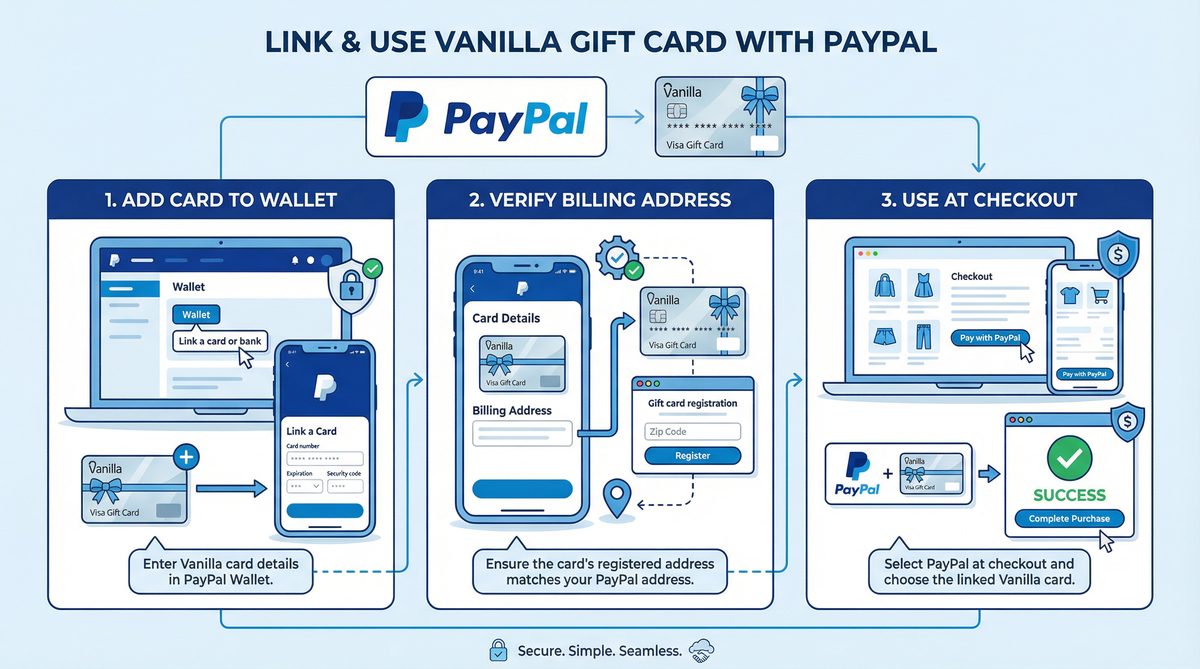
Vanilla Gift Cards are a popular gift option, offering flexibility for recipients to use them at a wide range of stores and online. With the growing popularity of digital wallets like PayPal, many people wonder how to integrate these cards with their PayPal accounts to maximize their benefits. This article will provide a comprehensive step-by-step guide on how to use your Vanilla gift card on PayPal, highlighting best practices, solutions to common issues, and tips to improve your experience.
Before diving into the practical steps, it's important to understand the nature of both Vanilla gift cards and PayPal and how they interact.
Vanilla gift cards are prepaid cards bearing the Visa or Mastercard logo. These cards work like regular debit cards but are not reloadable and come with a predetermined balance. They can be used anywhere that accepts Visa or Mastercard, whether in physical stores or online. These cards typically don't require complex activation, but it's always recommended to register them online and assign a ZIP code to enable their use in online transactions.
PayPal is a global electronic payment system that allows users to send and receive money over the Internet. PayPal accounts can be linked to bank accounts, credit cards, and debit cards, providing a secure and convenient way to make online payments. PayPal is known for protecting both buyers and sellers, making it a trusted option for millions worldwide.
Yes, generally, Vanilla gift cards bearing the Visa or Mastercard logo can be used on PayPal. PayPal treats these cards as regular debit cards. However, there are some conditions and requirements that must be met to ensure a smooth linking and usage process. The most important of these is that the card must be activated, have sufficient balance to cover any temporary verification fees, and have a registered ZIP code.
The process of linking a Vanilla gift card to your PayPal account involves a few simple steps. You can do this either through the PayPal website or through the PayPal mobile app.
Before attempting to link the card to PayPal, make sure it's activated and registered. Cards are usually activated automatically at purchase, but it's always best to verify this. Most importantly, you must register the card online and assign a ZIP code to it. This is necessary for online transactions, as PayPal requires address and ZIP code matching for security purposes.
This method is the most straightforward and provides full visibility of any verification requests.
If you prefer to manage your payments from your phone, you can link a Vanilla gift card through the PayPal app.
Sometimes, PayPal may request verification of the card before you can use it. This is done automatically through a small authorization process.
PayPal may place a temporary hold for a small amount (about one dollar) on the card. This amount is not actually deducted; it's a procedure to verify the card's validity and will be released shortly. If your Vanilla gift card balance is too low, this temporary authorization may fail, resulting in card rejection. Make sure you have sufficient balance to cover this temporary amount.
Once the card is successfully linked, PayPal will treat it like a regular debit card. You can select it as a funding source when making supported purchases.
When completing a purchase through PayPal, your Vanilla gift card will appear as an option among available funding sources. Select it, and PayPal will use the balance on the card until it's depleted. If the purchase amount is greater than your card balance, you may need to link a secondary funding source (such as a bank account or another credit card) to cover the remaining amount.
If you need to remove the card from your PayPal account or update its information (such as changing the ZIP code), you can do so through the Wallet page on the PayPal website or in the app.
Most card rejections occur due to information mismatch or insufficient funds. Here are some common solutions:
If you receive an error message indicating an address mismatch, it means the ZIP code you entered in PayPal doesn't match the ZIP code registered with the Vanilla gift card issuer. Update your card's ZIP code through the card activation website, then try linking it to PayPal again.
As mentioned earlier, PayPal requires sufficient balance on the card to cover temporary authorization fees. If your card balance is too low, it may be rejected. Make sure you have at least one dollar (or equivalent in local currency) on the card.
Many Vanilla gift cards sold in the United States are designed to work only with US PayPal accounts. If your PayPal account is registered in a region that doesn't match the card's issuance region, PayPal may reject the card. Check your card's terms and conditions.
Even if PayPal accepts the card, you may not be able to transfer its balance to your PayPal balance. PayPal typically treats gift cards as a direct payment method during checkout, not as a source for funding your PayPal balance.
If you're still having trouble linking your Vanilla gift card, try these additional steps:
| Feature / Method | Direct Link to PayPal | Use Card Directly for Purchase (Without Linking) |
|---|---|---|
| Ease of Use | Medium | Easy |
| Security | High | High |
| Flexibility | High (can be combined with other funding sources) | Medium (depends on card balance only) |
| Verification Required | Yes (ZIP code, sufficient balance for authorization) | No |
| Troubleshooting | Requires more complex error checking | Less complex |
No, in most cases, you cannot transfer your Vanilla gift card balance to your PayPal balance. PayPal typically uses these cards for direct payment when making purchases.
PayPal may reject cards linked to unsupported regions or cards that don't have a registered ZIP code. Make sure your card is activated and has a correct ZIP code registered.
You may need to enter a ZIP code or address to match what is registered with the card issuer.
Yes, you can link more than one card, but PayPal enforces limits on the total number of cards you can store in your wallet.
If your Vanilla gift card balance is less than the purchase amount, you can use it to cover part of the amount, then use another funding source (such as a credit card or bank account linked to PayPal) to cover the remaining amount.
Using a Vanilla gift card on PayPal is a convenient and effective way to manage your money and make online payments. By following the steps outlined above and ensuring your card is activated and has a correct ZIP code registered, you can successfully link your card and enjoy the flexibility of online shopping. Always remember to check your card balance before making a purchase and address any issues related to address mismatches or regional restrictions.
Click Here to Visit PayPal and Start Linking Your Card Now!